If you’re tired of writing endless YAML or JSON for your cloud infrastructure, AWS CDK might just be your new best friend. It transforms infrastructure management into a developer-friendly, code-driven experience—using real programming languages.



What Is AWS CDK and Why It’s a Game-Changer

AWS CDK, or Amazon Web Services Cloud Development Kit, is an open-source software development framework that allows developers to define cloud infrastructure using familiar programming languages like TypeScript, Python, Java, C#, and Go. Instead of writing CloudFormation templates in YAML or JSON, you write code that generates those templates automatically.
How AWS CDK Differs from Traditional IaC Tools
Unlike tools like AWS CloudFormation or Terraform, which rely on declarative configuration files, AWS CDK uses imperative code. This means you can leverage loops, conditionals, functions, and object-oriented programming to build reusable and dynamic infrastructure.
- Traditional IaC: Static JSON/YAML files with limited logic
- AWS CDK: Full programming power with IDE support, type checking, and debugging
- Output: Still generates AWS CloudFormation under the hood
“AWS CDK bridges the gap between developers and DevOps by speaking the language of code.” — AWS Official Blog
Supported Programming Languages
One of the biggest strengths of AWS CDK is its multi-language support. You don’t need to learn a new DSL (Domain-Specific Language); you use what you already know.
- TypeScript (most mature and widely used)
- Python (popular in data and ML workflows)
- Java (enterprise-grade applications)
- C# (.NET ecosystem)
- Go (growing support, ideal for performance-critical setups)
Each language has its own SDK package (e.g., aws-cdk-lib for TypeScript), maintained by AWS, ensuring consistency across platforms.
Core Concepts of AWS CDK: Stacks, Constructs, and Apps
To master AWS CDK, you need to understand its foundational building blocks: apps, stacks, and constructs. These abstractions make it easy to organize and scale your infrastructure code.
Apps: The Entry Point of Your CDK Project
An app is the root of your CDK application. It’s typically a single file (like app.ts in TypeScript) that instantiates one or more stacks. Think of it as the main() function in a traditional program.
- Creates and assembles stacks
- Can deploy multiple environments (dev, staging, prod)
- Can be version-controlled and tested like any other code
Example in TypeScript:
const app = new cdk.App();
new MyFirstStack(app, 'MyDevStack');
new MyFirstStack(app, 'MyProdStack', { env: { account: '123456789', region: 'us-west-2' } });
Stacks: Deployable Units of Infrastructure
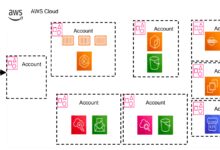
A stack is a unit of deployment in AWS CDK, equivalent to an AWS CloudFormation stack. Each stack contains a collection of AWS resources (like EC2 instances, S3 buckets, Lambda functions) that are deployed together.
- Can be isolated by environment (dev, test, prod)
- Supports cross-stack references (e.g., sharing a VPC between services)
- Can be tagged, versioned, and rolled back independently
Best Practice: Keep stacks focused. For example, separate networking, compute, and data layers into different stacks for better modularity.
Constructs: Reusable Infrastructure Components
Constructs are the heart of AWS CDK. They are reusable, composable building blocks that encapsulate one or more AWS resources. There are three levels of constructs:
- Level 1 (Cfn*): Direct wrappers over CloudFormation resources (low-level, verbose)
- Level 2: Opinionated, higher-level constructs with sensible defaults (e.g.,
s3.Bucket) - Level 3 (Patterns): Pre-built solutions for common architectures (e.g.,
ApplicationLoadBalancedFargateService)
You can also create your own custom constructs to standardize patterns across teams.
“Constructs turn infrastructure into lego blocks—snap them together and build fast.” — AWS CDK Developer Guide
Setting Up Your First AWS CDK Project
Getting started with AWS CDK is straightforward. Whether you’re using TypeScript or Python, the setup process is well-documented and developer-friendly.
Prerequisites and Installation
Before you begin, ensure you have the following installed:
- Node.js (for TypeScript/JavaScript) or Python 3.6+ (for Python)
- npm or pip (package managers)
- AWS CLI configured with credentials (
aws configure) - Git (optional, for version control)
Install the AWS CDK CLI globally:
npm install -g aws-cdkVerify installation:
cdk --versionFor Python users:
pip install aws-cdk-libInitializing a New CDK Project
Use the cdk init command to scaffold a new project:
mkdir my-cdk-app
cd my-cdk-app
cdk init app --language typescript
This creates a boilerplate project with:
- Source files in
lib/ - Configuration in
cdk.json - Package management via
package.json - Git ignore and README
The main stack file (e.g., my-cdk-app-stack.ts) is where you define your resources.
Deploying Your First Stack
Once you’ve defined your infrastructure, deploy it with a single command:
cdk deployThis process:
- Synthesizes your code into a CloudFormation template
- Uploads assets (like Lambda code) to S3
- Creates or updates the stack in your AWS account
You’ll be prompted to confirm the changeset before deployment. After confirmation, AWS CDK provisions the resources.
Pro Tip: Use
cdk diffbefore deploying to see what will change in your stack.
Real-World Use Cases of AWS CDK
AWS CDK isn’t just for toy projects—it’s used in production by startups and enterprises alike. Its flexibility makes it ideal for a wide range of scenarios.
Serverless Applications with API Gateway and Lambda
Building serverless apps is one of the most popular use cases. With AWS CDK, you can define a complete serverless backend in minutes.
- Create Lambda functions with automatic IAM roles
- Attach them to API Gateway endpoints
- Add environment variables, layers, and concurrency controls
Example:
const lambda = new lambda.Function(this, 'MyFunction', {
  runtime: lambda.Runtime.NODEJS_18_X,
  handler: 'index.handler',
  code: lambda.Code.fromAsset('lambda'),
});

const api = new apigateway.LambdaRestApi(this, 'MyApi', {
  handler: lambda,
});
This creates a fully functional REST API backed by Lambda.
Containerized Workloads with ECS and Fargate
AWS CDK simplifies deploying containerized applications using Amazon ECS and AWS Fargate. You can define clusters, services, load balancers, and auto-scaling policies in code.
- Use
ApplicationLoadBalancedFargateServicefor quick setup - Define task definitions, container images, and port mappings
- Integrate with CloudWatch for logging
Example:
const service = new ecs_patterns.ApplicationLoadBalancedFargateService(this, 'MyService', {
  cluster,
  taskImageOptions: { image: ecs.ContainerImage.fromRegistry('nginx') },
  publicLoadBalancer: true,
});
This single line deploys a scalable, load-balanced Fargate service.
Data Pipelines with S3, Glue, and Lambda
For data engineering teams, AWS CDK enables infrastructure-as-code for ETL pipelines.
- Create S3 buckets with event notifications
- Trigger Lambda functions on file uploads
- Orchestrate Glue jobs for data transformation
You can even define event rules using Amazon EventBridge to automate workflows.
“With AWS CDK, our data team reduced pipeline setup time from days to hours.” — Tech Lead, SaaS Startup
Advanced AWS CDK Features You Should Know
Once you’re comfortable with the basics, it’s time to explore advanced features that unlock the full potential of AWS CDK.
Custom Constructs and Shared Libraries
Teams can create reusable custom constructs to enforce best practices and reduce duplication.
- Package constructs as npm modules or Python packages
- Share across projects or teams
- Version and test like any software library
Example: A SecureS3Bucket construct that enforces encryption, logging, and access controls.
This promotes consistency and reduces security risks.
Environment-Aware Deployments
AWS CDK supports multiple environments (dev, staging, prod) through context and configuration.
- Use
envproperty to specify account and region - Leverage context variables (
cdk.context.json) for dynamic values - Use
StageandPipelineconstructs for CI/CD
Example:
new MyStack(app, 'ProdStack', {
  env: { account: '111122223333', region: 'us-east-1' }
});
This enables safe, isolated deployments across accounts.
Integration with CI/CD Pipelines
AWS CDK works seamlessly with AWS CodePipeline, GitHub Actions, and other CI/CD tools.
- Synthesize and deploy stacks automatically on push
- Use
cdk deploy --require-approval=neverin pipelines - Validate changes with
cdk diffin pre-deploy steps
You can also use the pipelines module to define CI/CD pipelines in CDK itself.
“We now deploy infrastructure changes as part of our pull request flow—no more manual deployments.” — DevOps Engineer
Best Practices for AWS CDK Development
Following best practices ensures your AWS CDK projects are maintainable, secure, and scalable.
Use High-Level Constructs When Possible
Prefer Level 2 and Level 3 constructs over low-level Cfn resources. They include security defaults, reduce boilerplate, and are less error-prone.
- Use
s3.Bucketinstead ofCfnBucket - Use
lambda.Functionwith built-in role creation - Leverage patterns like
QueueProcessingFargateService
This improves readability and reduces configuration drift.
Organize Code with Modular Stacks
Break your infrastructure into logical stacks:
- Networking stack (VPC, subnets, route tables)
- Database stack (RDS, DynamoDB)
- Application stack (Lambda, ECS, API Gateway)
This enables independent deployment and rollback, and reduces blast radius during updates.
Secure Your Infrastructure by Default
Security should be baked into your CDK code:
- Enable encryption on S3 buckets, EBS volumes, and RDS instances
- Use least-privilege IAM roles
- Avoid hardcoded secrets—use AWS Secrets Manager or Parameter Store
You can also use CDK Guard to enforce security policies across your stacks.
“Security is not an afterthought—it’s code.” — AWS Security Best Practices
Common Pitfalls and How to Avoid Them
Even experienced developers run into issues with AWS CDK. Here are common pitfalls and how to avoid them.
Overusing Low-Level Constructs
While Cfn* resources give you full control, they bypass CDK’s safety nets.
- They don’t include default security settings
- They require manual IAM role configuration
- They increase code complexity
Solution: Use high-level constructs unless you need specific CloudFormation features.
Ignoring Stack Dependencies
When stacks depend on each other (e.g., VPC in one stack, EC2 in another), you must define explicit dependencies.
- Use
stack.exportValue()andFn.importValue()for cross-stack references - Or use the
cdk.Stack.of(this).exportValue()pattern
Failure to do so can cause deployment failures or dangling resources.
Hardcoding Sensitive Data
Never hardcode passwords, API keys, or account IDs in your CDK code.
- Use
SecretsManager.Secret.fromSecretName() - Or
cdk.SecretValuefor dynamic values - Leverage context or parameter files for environment-specific values
This keeps your code secure and portable.
Comparing AWS CDK with Other Infrastructure Tools
While AWS CDK is powerful, it’s not the only option. Let’s compare it with other popular IaC tools.
AWS CDK vs AWS CloudFormation
CloudFormation is the underlying engine for AWS CDK, but they differ significantly.
- CloudFormation: Declarative, YAML/JSON, no logic, hard to maintain at scale
- AWS CDK: Imperative, code-based, supports logic, reusable, testable
CDK generates CloudFormation templates, so you get the best of both worlds: code flexibility with CloudFormation reliability.
AWS CDK vs Terraform
Terraform is a multi-cloud IaC tool using HCL (HashiCorp Configuration Language).
- Terraform: Multi-cloud, state file management, strong community
- AWS CDK: AWS-only, uses real programming languages, tighter AWS integration
If you’re fully on AWS, CDK offers better developer experience. If you need multi-cloud, Terraform may be better.
AWS CDK vs Pulumi
Pulumi is a direct competitor to AWS CDK, also using real languages for IaC.
- Pulumi: Multi-cloud, uses own backend or self-managed state
- AWS CDK: AWS-focused, uses CloudFormation for state management
CDK is free and deeply integrated with AWS services. Pulumi offers more cloud flexibility but requires a subscription for advanced features.
“For AWS-centric teams, CDK feels like home.” — Cloud Architect
What is AWS CDK used for?
AWS CDK is used to define and deploy cloud infrastructure using familiar programming languages. It’s ideal for building serverless apps, containerized services, data pipelines, and complex AWS architectures with reusable, testable code.
Is AWS CDK better than Terraform?
It depends on your needs. AWS CDK is better if you’re fully on AWS and want a developer-friendly experience. Terraform is better for multi-cloud environments and teams already invested in HCL.
Can I use AWS CDK with Python?
Yes, AWS CDK fully supports Python. You can define stacks and resources using Python classes and deploy them just like TypeScript projects.
Does AWS CDK replace CloudFormation?
No, AWS CDK does not replace CloudFormation. Instead, it generates CloudFormation templates under the hood. CDK is a higher-level abstraction that makes CloudFormation easier to use.
How do I debug AWS CDK applications?
You can debug CDK apps using standard language tools (e.g., console.log in TypeScript, print() in Python). Use cdk synth to inspect generated templates and cdk diff to preview changes before deployment.
AWS CDK revolutionizes how developers interact with cloud infrastructure. By using real programming languages, it brings infrastructure into the development workflow, enabling faster iteration, better testing, and greater reusability. Whether you’re building a simple Lambda function or a complex microservices architecture, AWS CDK provides the tools to do it efficiently and securely. As cloud environments grow more complex, tools like AWS CDK will become essential for maintaining agility and control.
Recommended for you 👇
Further Reading: